From Product Photos to Customer Calls: How E-Commerce Brands Are Automating Everything
How e-commerce brands automate the full customer journey, from product photography through post-purchase support calls, one AI tool per stage.
 Manav Gupta7 min read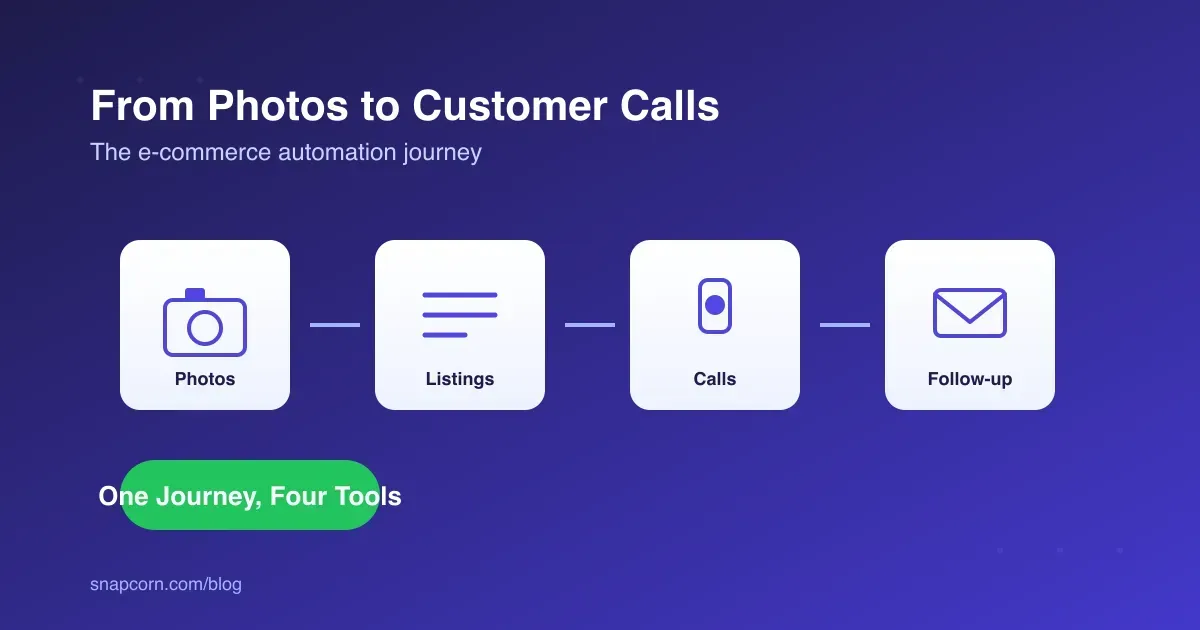
On this page
- The E-Commerce Automation Journey, Stage by Stage
- Where the Journey Starts: Product Photos
- Listing Copy That Doesn’t Take a Week
- What Happens After the Sale: Customer Calls
- How Can I Automate Appointment Scheduling for My Business Without Hiring a Full-Time Receptionist?
- Case Study: A DTC Skincare Brand’s Automation Timeline
- Comparing the Stages
- What This Costs vs. Hiring
- Where This Breaks Down
- FAQ
Key takeaways
- A DTC skincare brand's automation timeline: product photography, listing copy, post-purchase support, and follow-up email each run through a specialized AI tool instead of a growing headcount.
An e-commerce brand’s operations run through a predictable sequence: product gets photographed, the listing gets written, the sale happens, then support and follow-up start. Automating “everything” usually means putting one AI tool at each stage of that sequence rather than finding a single platform that does all four. The brands doing this well aren’t running one big system. They’re running four small ones that hand off cleanly.
The interesting part isn’t any single tool. It’s that the handoffs are the thing that used to require headcount, and now mostly don’t.
Key Takeaways
- E-commerce automation works stage by stage: photos, listings, support calls, follow-up email, not as one unified platform.
- Post-purchase support (returns, tracking, “where’s my order”) is the highest-volume, most automatable part of the journey, and the part most brands automate last.
- An AI receptionist handling post-purchase calls costs roughly $50-99 for 100 calls a month, against $500-900 for the same volume through a human line.
- Automated appointment and callback scheduling has shown a 60% efficiency gain and 2.5x more completed bookings in published case studies, without adding staff.
- The failure mode isn’t automating too much. It’s automating support without an escalation path, which turns a bad review into a public one.
The E-Commerce Automation Journey, Stage by Stage
Four stages, four tools, in the order a product actually moves through them:
- Photography: raw product shots go through Snapcorn for background removal and upscaling before they ever reach the storefront.
- Listings: product descriptions and ad copy get a first AI draft, then a human edit for voice and accuracy.
- Support: post-purchase calls, “where’s my order,” return requests, get answered by an AI receptionist like Voksha instead of sitting in a queue.
- Follow-up: review requests, shipping updates, and win-back email get drafted and triaged through a tool like Mailazy.
Each stage is independent. A brand can automate photography this month and support next quarter, in whatever order the backlog demands.
Where the Journey Starts: Product Photos
Photography is the easiest stage to automate because there’s no customer-facing failure mode, only a quality bar. A founder shooting products on a phone against a bedsheet gets the same clean, consistent background as a studio shoot, run through Snapcorn in seconds instead of scheduled with a photographer days in advance.
This matters more for e-commerce specifically than for other content types: a marketplace listing with an inconsistent or amateur photo background measurably underperforms a clean one, independent of the product itself. Fixing the photo is the cheapest conversion-rate improvement most small catalogs have available.
Listing Copy That Doesn’t Take a Week
The second stage, writing the actual listing, is where AI drafting tools save the most calendar time relative to the risk. A first draft of a product description, five bullet points, and an ad variant takes minutes instead of a day waiting on a freelancer. The catch is the same one that applies to any AI-drafted public content: it needs a human pass before it goes live, both for accuracy (AI tools invent specifications they don’t know) and for brand voice.
Brands that skip the edit step tend to notice it first in returns, when a listing overpromises something the product doesn’t do.
What Happens After the Sale: Customer Calls
This is the stage most DTC brands automate last, and it’s the one with the highest call volume. Once an order ships, a predictable set of questions starts: is this in stock for a reorder, where’s my package, how do I start a return, can I change my shipping address.
An AI receptionist handles this well because the questions are repetitive and the answers live in a system (order status, tracking, return policy) the AI can query directly. Voksha, for example, checks a calendar or order system in real time rather than reciting a static script, which is the difference between “let me have someone call you back” and actually resolving the question on the first call.
How Can I Automate Appointment Scheduling for My Business Without Hiring a Full-Time Receptionist?
Use an AI voice agent that reads your live calendar, offers open slots during the call, and books directly into your scheduling system. This replaces the core job of a receptionist (answering, qualifying, booking) without the fixed cost of a hire.
The economics are direct: a full-time receptionist runs roughly $55,000 a year once payroll tax and benefits are counted, and still only covers business hours. An AI scheduling agent covers the same job around the clock for a monthly subscription, and published case studies on scheduling automation report a 60% boost in scheduling efficiency and 2.5x more completed bookings, mostly from catching the after-hours and lunch-break calls a human line misses entirely.
For a DTC brand specifically, the same agent that books appointments (for brands with a service or consultation component) also handles order-status and return calls using the same underlying setup: calendar and order-system access, plus a script for the handful of question types that come up on repeat.
Case Study: A DTC Skincare Brand’s Automation Timeline
Picture a two-person skincare brand six months after launch, adding automation one stage at a time as volume grows:
- Month 1: Product photos move to Snapcorn once the founder is spending an evening a week on background editing by hand.
- Month 2: Listing copy gets a first AI draft for new SKUs, cutting the time from idea to live listing from a week to a day.
- Month 4: Order volume crosses roughly 40 calls a week, mostly “where’s my order,” and an AI receptionist takes over post-purchase calls, with refund disputes still routed to the founder.
- Month 5: Review-request and shipping-update email moves to an automated first draft, freeing up the hour a day the founder was spending on individual replies.
- Month 6: The founder is answering fewer than 5 calls a week personally, all of them the kind that actually need a person: a damaged shipment, a bulk order request, a partnership pitch.
Nothing in that timeline required a hire. It required four separate tools, added one at a time, as each one earned its place.
Comparing the Stages
| Stage | Tool | Replaces | Runs Unattended |
|---|---|---|---|
| Photography | Snapcorn | Photographer, photo editor | Yes |
| Listings | AI copywriting tool | Copywriter (first draft) | No, needs an editorial pass |
| Support calls | Voksha | Customer service rep | Yes, with escalation |
| Follow-up email | Mailazy | Support/marketing coordinator | Partial, review before send |
What This Costs vs. Hiring
A business handling 100 support calls a month spends roughly $50-99 on an AI receptionist covering that volume, against $500-900 for the same call volume through a human line, and considerably more than that for a dedicated hire. A part-time receptionist runs $1,500-2,500 a month before benefits; a live answering service runs $235-400 or more.
None of that accounts for the calls a human line simply doesn’t take: after hours, during lunch, on weekends. Those aren’t discounted calls under the AI model, they’re just answered, which is the actual source of the gap in outcomes, not just the gap in cost.
Where This Breaks Down
The failure mode isn’t automating too much of the journey. It’s automating support without a clear escalation path, or publishing AI-drafted listing copy that overstates what the product does. A customer with a damaged item who gets looped through a script instead of reaching a person turns into a public complaint fast, and a listing that promises something the product can’t deliver turns into a return and a bad review either way.
The fix is the same at every stage: define what the tool decides on its own, and what always goes to a person. For support specifically, that means the AI handles order status and standard returns, and hands off anything involving damage, disputes, or an upset customer, immediately and visibly, not after three failed attempts at a script.
FAQ
How can I automate appointment scheduling for my business without hiring a full-time receptionist? Use an AI voice agent that reads your live calendar and books directly into it during the call. It covers the core scheduling job a receptionist does, at a fraction of the roughly $55,000-a-year cost of a full-time hire, and works after hours, which is when a lot of missed bookings happen.
What’s the first stage of e-commerce automation most brands should tackle? Photography, because it has no customer-facing failure mode, or post-purchase support once call volume gets high enough to matter. Listings and email follow-up are lower-risk to delay.
Can an AI receptionist actually handle order status and returns? Yes, when it has access to the order and shipping system, since those are repetitive, data-driven questions. It should still escalate anything involving damage, disputes, or an angry customer to a person.
Does AI-drafted listing copy hurt SEO or conversion? Not by itself, but unedited AI copy that overstates a product’s specs or features leads directly to returns and bad reviews. Treat the AI draft as a starting point, not a finished listing.
Is this cheaper than hiring more support staff? Substantially. A business handling 100 support calls a month pays roughly $50-99 through an AI receptionist versus $500-900 through a human-staffed line, before even counting the calls a human line misses outside business hours.